Marmousi2 model
In this example (see benchmarks/src/dim2/marmousi) we simulate wave propagation through the 2-dimensional Marmousi2 model,
a complex synthetic velocity model commonly used for testing seismic wave propagation
codes. The model features realistic geological structures with varying velocity gradients,
making it an excellent benchmark for validating numerical methods.
Note
All cookbook files can be copy and pasted from the code blocks below, or you can download a zip file containing all the files needed to run this example.
Download Marmou si2 cookbook here
Or download using command line:
# Using curl:
curl -O https://specfem2d-kokkos.readthedocs.io/en/devel/sections/cookbooks/wavepropagation/dim2/marmousi/marmousi_cookbook.zip

# Using wget:
wget https://specfem2d-kokkos.readthedocs.io/en/devel/sections/cookbooks/wavepropagation/dim2/marmousi/marmousi_cookbook.zip
Warning
GPU Version Recommended
This cookbook example uses the Marmousi2 model, which is computationally intensive. It is recommended to run this example only if you have compiled the GPU version of SPECFEM++, as it will be too slow on CPUs. Additionally, MPI support is not yet implemented in this version.
Credits
Original Marmousi2 model: Yann Capdeville (2009)
Improved mesh: Hom Nath Gharti (2016, 2023)
CUBIT meshing workflow: Daniel Peter (Python scripts for streamlined mesh generation)
Setting up your workspace
Let’s start by creating a workspace from where we can run this example.
mkdir -p ~/specfempp-examples/marmousi
cd ~/specfempp-examples/marmousi
We also need to check that the SPECFEM++ executable directory is added to the
PATH.
which specfem2d
If the above command returns a path to the specfem2d executable, then the
executable directory is added to the PATH. If not, you need to add the executable
directory to the PATH using the following command.
export PATH=$PATH:<PATH TO SPECFEM++ DIRECTORY/bin>
Note
Make sure to replace <PATH TO SPECFEM++ DIRECTORY/bin> with the
actual path to the SPECFEM++ directory on your system.
Now let’s create the necessary directories to store the input files and output artifacts.
mkdir -p OUTPUT_FILES
mkdir -p OUTPUT_FILES/results

touch specfem_config.yaml
touch sources.yaml
touch Par_file
Mesh files
Unlike the homogeneous medium example, the Marmousi2 model uses an externally
generated mesh using Coreform Cubit’s built in Python interface. The
MESH-default directory contains all the necessary mesh files.
In the following subsections, we plot the first 20 lines of each mesh file used in this example, along with a brief description of their contents.
Note
The full file content are thousands of lines long, making it impractical to
include here and render on the webpage. Instead, please download the full
files using the link provided at the beginning of this cookbook. Or,
download the just the MESH-default directory:
Download MESH-default here
Or download using command line:
# Using curl:
curl -O https://specfem2d-kokkos.readthedocs.io/en/devel/sections/cookbooks/wavepropagation/dim2/marmousi/MESH-default.zip

# Using wget:
wget https://specfem2d-kokkos.readthedocs.io/en/devel/sections/cookbooks/wavepropagation/dim2/marmousi/MESH-default.zip
mesh_file
Element connectivity information
103944
        15         14          2          7
        16         13         14         15
        16         15          7          6
        19         12         13         16
        19         16          6          5
         1          8         17          3
         8          9         18         17
        18         19          5          4
         4          3         17         18
        18          9         10         19
        19         10         11         12
         1         20        230          8
       292        293        345        344
       293        294        346        345
       294        295        347        346
       295        296        348        347
       296        297        349        348
       297        298        350        349
       298        299        351        350
nodes_coords_file
Node coordinates
    104778
         8011.840000          2994.830000
         8152.000000          2994.510000
         8035.200000          2994.776667
         8058.560000          2994.723333
         8081.920000          2994.670000
         8105.280000          2994.616667
         8128.640000          2994.563333
         8017.540000          2980.250000
         8027.190000          2966.670000
         8045.460000          2941.830000
         8050.460000          2935.160000
         8073.682098          2953.647919
         8097.887432          2970.814620
         8123.912343          2985.033744
         8117.565044          2987.848502
         8100.151581          2983.958004
         8032.931723          2983.951007
         8046.054348          2976.827670
         8068.281119          2971.981162
materials_file
Material assignments for each element
         1
         1
         1
         1
         1
         1
         1
         1
         1
         1
         1
         2
         2
         2
         2
         2
         2
         2
         2
         2
nummaterial_velocity_file_marmousi2
Velocity model properties
# nummaterial_velocity_file for Marmousi2 - created by script convert_surface_rock_to_velocities.py
#
# velocity and density models:
#   nbmodels  = 435
#   using water layer (material_id==240)
#
# format:
# (instead of anisotropy flag, added compaction gradient k)
#domain_id #material_id #rho #Vp #Vs #QKappa #Qmu #k(instead of ani==0)
#
2   1  1960.3399  1534.0000   314.1800 9999.0 9999.0 0.250000
2   2  1960.3433  1534.0100   314.1877 9999.0 9999.0 0.250000
2   3  1932.7124  1454.0000   252.5800 9999.0 9999.0 0.250000
2   4  1918.4777  1414.0000   221.7800 9999.0 9999.0 0.250000
2   5  1929.1774  1443.9900   244.8723 9999.0 9999.0 0.250000
2   6  1914.8729  1404.0000   214.0800 9999.0 9999.0 0.250000
2   7  1977.0734  1584.0000   352.6800 9999.0 9999.0 0.250000
2   8  1840.1801  1484.0000   337.1360 9999.0 9999.0 0.250000
2   9  1960.3399  1534.0000   314.1800 9999.0 9999.0 0.250000
2  10  1970.4273  1564.0000   337.2800 9999.0 9999.0 0.250000
free_surface_file
Free surface boundary definition
       681
     49177          2      52430      52451
     49178          2      52451      52452
     49179          2      52452      52453
     49180          2      52453      52454
     49181          2      52454      52455
     49182          2      52455      52456
     49183          2      52456      52457
     49184          2      52457      52458
     49185          2      52458      52459
     49186          2      52459      52460
     49187          2      52460      52461
     49188          2      52461      52462
     49189          2      52462      52463
     49190          2      52463      52464
     49191          2      52464      52465
     49192          2      52465      52466
     49193          2      52466      52467
     49194          2      52467      52468
     49195          2      52468      52469
absorbing_surface_file
Absorbing boundary conditions
       985
        13          2        292        344          4
       937          2       1269        292          4
      2019          2       2121       1921          4
      2020          2       2121       1269          4
      2080          2       2461       1921          4
      2471          2       2853       2461          4
      3193          2       3580       3251          4
      3194          2       2853       3580          4
      3550          2       3941       3251          4
      3968          2       4439       3941          4
      4360          2       4766       5098          4
      4837          2       5535       5869          4
      4838          2       5869       4766          4
      5378          2       5535       6079          4
      5965          2       6079       7005          4
      6669          2       7005       6669          4
      7029          2       7769       7750          4
      7030          2       7769       6669          4
      7234          2       7947       7750          4
Generating the mesh database
To generate the mesh database for SPECFEM++ we need a parameter file (Par_file),
the mesh files (in MESH-default), and the mesher executable (xmeshfem2D).
Note
This example uses the external mesh capability of SPECFEM2D. The mesh was originally created using CUBIT/Trelis, a powerful meshing tool that allows for complex geometries and variable mesh refinement.
Parameter File
#-----------------------------------------------------------
#
# Simulation input parameters
#
#-----------------------------------------------------------

# title of job
title                           = Marmousi2 simulation

# parameters concerning partitioning
NPROC                           = 1              # number of processes

# Output folder
OUTPUT_FILES                    = OUTPUT_FILES

#-----------------------------------------------------------
#
# Mesh
#
#-----------------------------------------------------------

# Partitioning algorithm for decompose_mesh
PARTITIONING_TYPE               = 3              # SCOTCH = 3, ascending order (very bad idea) = 1

# number of control nodes per element (4 or 9)
NGNOD                           = 4

# location to store the mesh
database_filename               = OUTPUT_FILES/database.bin

# available models
#   default       - define model using nbmodels below
#   ascii         - read model from ascii database file
#   binary        - read model from binary databse file
#   binary_voigt  - read Voigt model from binary database file
#   external      - define model using define_external_model subroutine
#   gll           - read GLL model from binary database file
#   legacy        - read model from model_velocity.dat_input
MODEL                           = default

# Output the model with the requested type, does not save if turn to default or .false.
# (available output formats: ascii,binary,gll,legacy)
SAVE_MODEL                      = default


#-----------------------------------------------------------
#
# Receivers
#
#-----------------------------------------------------------

# use an existing STATION file found in ./DATA or create a new one from the receiver positions below in this Par_file
use_existing_STATIONS           = .false.

# number of receiver sets (i.e. number of receiver lines to create below)
nreceiversets                   = 1

# orientation
anglerec                        = 0.d0           # angle to rotate components at receivers
rec_normal_to_surface           = .false.        # base anglerec normal to surface (external mesh and curve file needed)

# first receiver set (repeat these 6 lines and adjust nreceiversets accordingly)
nrec                            = 11             # number of receivers
xdeb                            = 1000.          # first receiver x in meters
zdeb                            = 3450.          # first receiver z in meters
xfin                            = 11000.         # last receiver x in meters (ignored if only one receiver)
zfin                            = 3450.          # last receiver z in meters (ignored if only one receiver)
record_at_surface_same_vertical = .false.        # receivers inside the medium or at the surface (z values are ignored if this is set to true, they are replaced with the topography height)


# Stationsfilename
stations_filename               = STATIONS       # file containing the receivers positions and orientations (if not using an existing STATION file)


#-----------------------------------------------------------
#
# Boundary conditions
#
#-----------------------------------------------------------

# Stacey ABC
STACEY_ABSORBING_CONDITIONS     = .true.

#-----------------------------------------------------------
#
# Velocity and density models
#
#-----------------------------------------------------------


# material properties
# number of model materials
nbmodels                        = 1
# available material types (see user manual for more information)
#   acoustic:              model_number 1 rho Vp 0  0 0 QKappa 9999 0 0 0 0 0 0 (for QKappa use 9999 to ignore it)
#   elastic:               model_number 1 rho Vp Vs 0 0 QKappa Qmu  0 0 0 0 0 0 (for QKappa and Qmu use 9999 to ignore them)
#   anisotropic:           model_number 2 rho c11 c13 c15 c33 c35 c55 c12 c23 c25   0 QKappa Qmu
#   anisotropic in AXISYM: model_number 2 rho c11 c13 c15 c33 c35 c55 c12 c23 c25 c22 QKappa Qmu
#   poroelastic:           model_number 3 rhos rhof phi c kxx kxz kzz Ks Kf Kfr etaf mufr Qmu
#   electromagnetic:       model_number 4 mu0 e0 e11(e0) e33(e0) sig11 sig33 Qe11 Qe33 Qs11 Qs33 0 0 0
#   tomo:                  model_number -1 0 0 A 0 0 0 0 0 0 0 0 0 0
#
# note: When viscoelasticity or viscoacousticity is turned on,
#       the Vp and Vs values that are read here are the UNRELAXED ones i.e. the values at infinite frequency
#       unless the READ_VELOCITIES_AT_f0 parameter above is set to true, in which case they are the values at frequency f0.
#
#       Please also note that Qmu is always equal to Qs, but Qkappa is in general not equal to Qp.
#       To convert one to the other see doc/Qkappa_Qmu_versus_Qp_Qs_relationship_in_2D_plane_strain.pdf and
#       utils/attenuation/conversion_from_Qkappa_Qmu_to_Qp_Qs_from_Dahlen_Tromp_959_960.f90.
#
1 1 2700.d0 3000.d0 1732.051d0 0.2 0 9999 9999 0 0 0 0 0 0


# external tomography file
# (used for tomography materials with negative material ids and/or MODEL==tomo settings)
TOMOGRAPHY_FILE                 = dummy

# use an external mesh created by an external meshing tool or use the internal mesher
read_external_mesh              = .true.

#-----------------------------------------------------------
#
# PARAMETERS FOR EXTERNAL MESHING
#
#-----------------------------------------------------------

# data concerning mesh, when generated using third-party app (more info in README)
# (see also absorbing_conditions above)
mesh_file                       = MESH-default/mesh_file                # file containing the mesh
nodes_coords_file               = MESH-default/nodes_coords_file        # file containing the nodes coordinates
materials_file                  = MESH-default/materials_file           # file containing the material number for each element
nummaterial_velocity_file       = MESH-default/nummaterial_velocity_file_marmousi2   # file containing the material properties for each material
free_surface_file               = MESH-default/free_surface_file        # file containing the free surface
axial_elements_file             = dummy                                   # file containing the axial elements if AXISYM is true
absorbing_surface_file          = MESH-default/absorbing_surface_file   # file containing the absorbing surface
acoustic_forcing_surface_file   = dummy                                   # file containing the acoustic forcing surface
absorbing_cpml_file             = dummy                                   # file containing the CPML element numbers
tangential_detection_curve_file = dummy                                   # file containing the curve delimiting the velocity model

#-----------------------------------------------------------
#
# PARAMETERS FOR INTERNAL MESHING
#
#-----------------------------------------------------------


# file containing interfaces for internal mesh
interfacesfile                  = dummy

# geometry of the model (origin lower-left corner = 0,0) and mesh description
xmin                            = 0.d0           # abscissa of left side of the model
xmax                            = 0.d0           # abscissa of right side of the model
nx                              = 0              # number of elements along X

# absorbing boundary parameters (see absorbing_conditions above)
absorbbottom                    = .true.
absorbright                     = .true.
absorbtop                       = .false.
absorbleft                      = .true.


# define the different regions of the model in the (nx,nz) spectral-element mesh
nbregions                       = 1              # then set below the different regions and model number for each region
# format of each line: nxmin nxmax nzmin nzmax material_number
1 0  1 0 1

#-----------------------------------------------------------
#
# Display parameters
#
#-----------------------------------------------------------
# meshing output
output_grid_Gnuplot             = .false.        # generate a GNUPLOT file containing the grid, and a script to plot it
output_grid_ASCII               = .false.        # dump the grid in an ASCII text file consisting of a set of X,Y,Z points or not
Key parameters for the Marmousi2 model:
NPROC: Set to 1 (MPI not yet supported)
read_external_mesh: Set to
.true.to use the CUBIT-generated meshuse_existing_STATIONS: Set to
.false.to generate STATIONS from receiver set parametersExternal mesh files: Point to the files in the
MESH-defaultdirectory
Receiver Configuration
The receivers are defined in the Par_file using the receiver set parameters. The mesher will automatically generate a STATIONS file based on these parameters:
63# first receiver set (repeat these 6 lines and adjust nreceiversets accordingly)
64nrec                            = 11             # number of receivers
65xdeb                            = 1000.          # first receiver x in meters
66zdeb                            = 3450.          # first receiver z in meters
67xfin                            = 11000.         # last receiver x in meters (ignored if only one receiver)
68zfin                            = 3450.          # last receiver z in meters (ignored if only one receiver)
69record_at_surface_same_vertical = .false.        # receivers inside the medium or at the surface (z values are ignored if this is set to true, they are replaced with the topography height)
This configuration creates 11 receivers positioned along a horizontal line at depth z=3450m, spaced 1000m apart from x=1000m to x=11000m.
Running xmeshfem2D
To execute the mesher and generate the database:
xmeshfem2D -p Par_file
This will read the external mesh files and create a binary database file
(OUTPUT_FILES/database.bin) that SPECFEM++ can use for the simulation.
Check the mesher generated files in the OUTPUT_FILES directory:
ls -ltr OUTPUT_FILES
You should see database.bin and STATIONS files, along with VTK files
for visualization.
Defining sources
Next we define the source using a YAML file. For full description on parameters used to define sources refer Source Description.
number-of-sources: 1
sources:
  - force:
      x : 5000.0
      z : 3450.0
      source_surf: false
      angle : 0.0
      vx : 0.0
      vz : 0.0
      Ricker:
        factor: 1e10
        tshift: 0.0
        f0: 5.0
In this file, we define a single force source at coordinates (5000.0, 3450.0) meters. The source uses a Ricker wavelet with a peak frequency of 5.0 Hz, which is appropriate for this model given its complex structure and heterogeneity.
Configuring the solver
Now that we have generated the mesh database and defined the sources, we need to
set up the solver. To do this we define another YAML file specfem_config.yaml.
For full description on parameters used to configure the solver refer
SPECFEM++ Parameter Documentation.
## This is a Marmousi2 simulation using externally generated mesh

parameters:

  header:
    ## Header information is used for logging. It is good practice to give your simulations explicit names
    title: Marmousi2 simulation with external mesh  # name for your simulation
    # A detailed description for your simulation
    description: |
      Material systems : Elastic domain (1)
      Mesh : External mesh from CUBIT
      Sources : Force source (1)
      Boundary conditions : Stacey absorbing on bottom, left and right edges

  simulation-setup:
    ## quadrature setup
    elastic-wave: P_SV
    quadrature:
      quadrature-type: GLL4

    ## Solver setup
    solver:
      time-marching:
        time-scheme:
          type: Newmark
          dt: 5.0e-6
          nstep: 1000000

    simulation-mode:
      forward:
        writer:
          seismogram:
            format: "ascii"
            directory: "OUTPUT_FILES/results"

          # Uncomment the following lines to enable display output if VTK is installed
          # display:
          #   directory: "OUTPUT_FILES/display"
          #   format: PNG
          #   field: displacement
          #   simulation-field: forward
          #   time-interval: 100

  receivers:
    stations: "OUTPUT_FILES/STATIONS"
    angle: 0.0
    seismogram-type:
      - displacement
    nstep_between_samples: 1

  ## Runtime setup
  run-setup:
    number-of-processors: 1
    number-of-runs: 1

  ## databases
  databases:
    mesh-database: "OUTPUT_FILES/database.bin"

  ## sources
  sources: "sources.yaml"

  ## Log file
  log-file: "OUTPUT_FILES/output"
Key configuration points for the Marmousi2 simulation:
Time step:
dt: 5.0e-6(5 microseconds) - small enough for numerical stabilityNumber of steps:
nstep: 1000- total simulation time of 0.005 secondsQuadrature:
GLL4- 4th order Gauss-Lobatto-Legendre quadratureTime scheme:
Newmark- second-order accurate time integrationOutput format:
asciifor seismograms
Note
The small time step (5 microseconds) is necessary due to the fine mesh resolution
and high velocities in the Marmousi2 model. For longer simulations, you may want
to increase nstep accordingly.
Running the solver
Finally, to run the SPECFEM++ solver:
specfem2d -p specfem_config.yaml
Note
Make sure either you are in the executable directory of SPECFEM++ or the
executable directory is added to your PATH.
The solver will output progress information and save seismograms to
OUTPUT_FILES/results/.
Visualizing seismograms
Let us now plot the traces generated by the solver using obspy. The following
Python script reads the ASCII seismogram files and creates plots for each component.
import os
import numpy as np
import obspy


def get_traces(directory):
    traces = []
    ## iterate over all seismograms
    for filename in os.listdir(directory):
        f = os.path.join(directory, filename)
        network, station, location, channel = filename.split(".")[:4]
        trace = np.loadtxt(f, delimiter=" ")
        starttime = trace[0, 0]
        dt = trace[1, 0] - trace[0, 0]
        traces.append(
            obspy.Trace(
                trace[:, 1],
                {
                    "network": network,
                    "station": station,
                    "location": location,
                    "channel": channel,
                    "starttime": starttime,
                    "delta": dt,
                },
            )
        )

    stream = obspy.Stream(traces)

    return stream


directory = "OUTPUT_FILES/results"
stream = get_traces(directory)
stream.select(component="X").plot(size=(1000, 800))
stream.select(component="Z").plot(size=(1000, 800))
To run the plotting script:
python plot_traces.py
This will display the seismograms for both X and Z components.
Expected Results
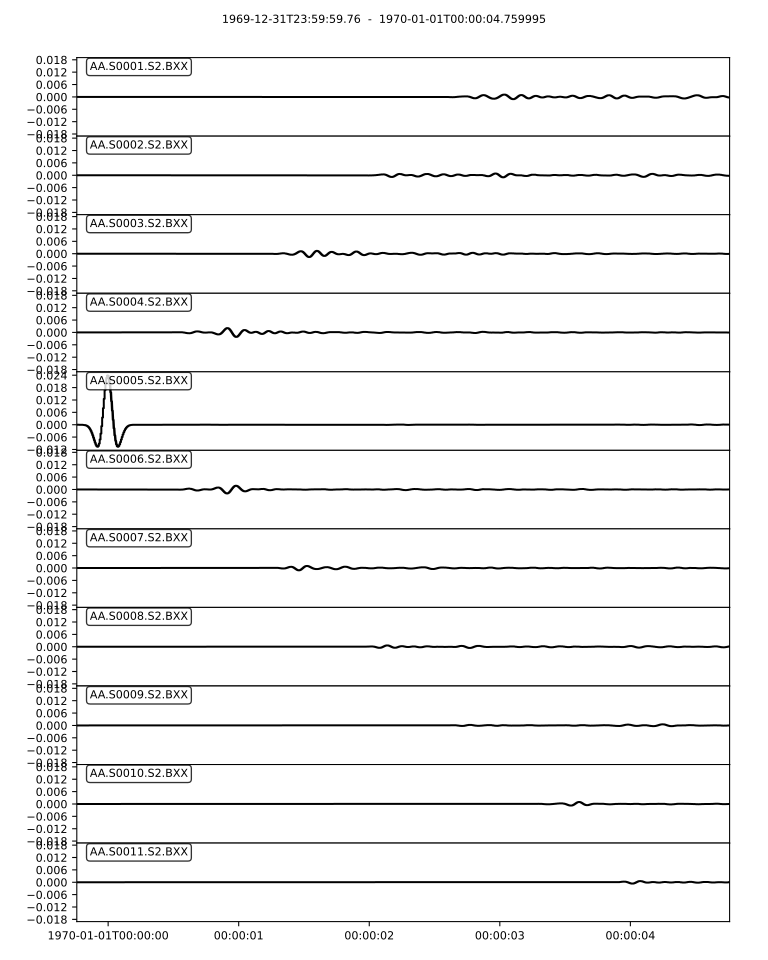
X-component seismograms from the Marmousi2 simulation
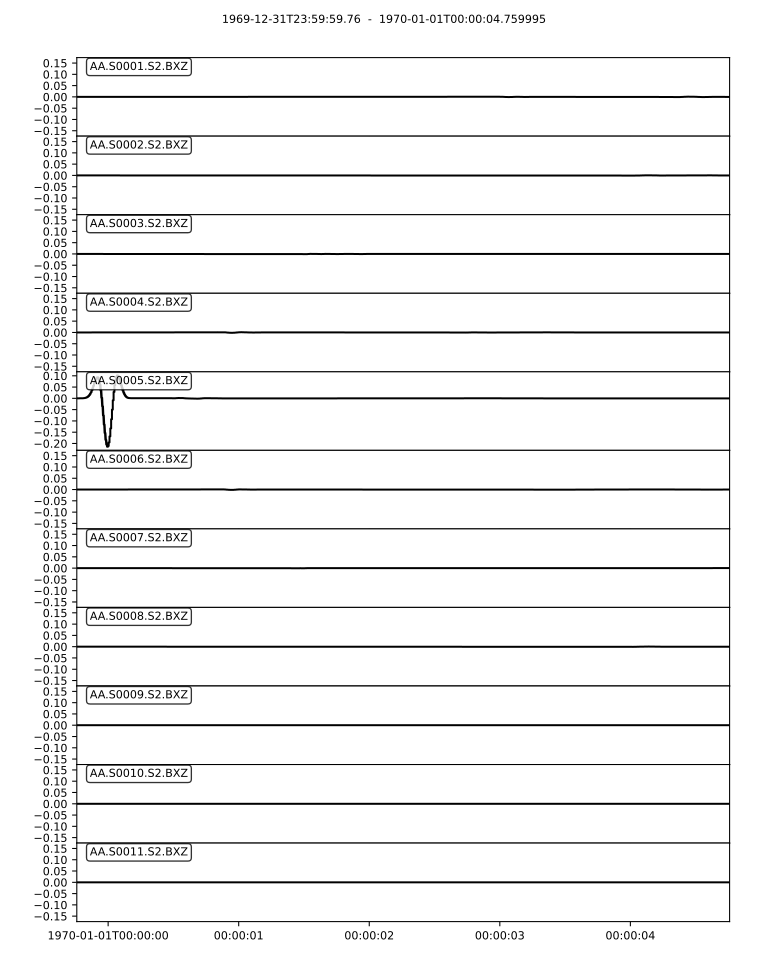
Z-component seismograms from the Marmousi2 simulation
The seismograms show complex waveforms resulting from scattering and reflection off the heterogeneous velocity structure in the Marmousi2 model. You should observe:
Direct P-wave arrivals
Multiple reflected and converted phases
Complex coda due to scattering from velocity heterogeneities
Amplitude variations across receivers due to focusing and defocusing effects
[Optional] Visualizing wavefield snapshots
If you enabled the display section output in the specfem_config.yaml, you
should be able to visualize wavefield snapshots using the built in VTK plotter.
The output snapshots will be saved in the OUTPUT_FILES/display/ directory as
PNGs. If you coalesce them into a video using ffmpeg, the resulting wavefield
should look like this:
About the Marmousi2 Model
The Marmousi2 model is an updated version of the original Marmousi model, designed to be a more realistic representation of geological structures found in sedimentary basins. It features:
Complex layered structures with faults and unconformities
Realistic velocity variations (ranging from ~1500 m/s to ~4500 m/s)
Variable mesh resolution to capture fine-scale features
Challenging geometry for testing numerical wave propagation codes
Ocean layer at the top
The mesh used in this example was improved by Hom Nath Gharti to provide better
element quality and accuracy compared to the original mesh. The CUBIT meshing
workflow, streamlined by Daniel Peter using Python scripts, allows for
reproducible and high-quality mesh generation. See the
benchmarks/src/dim2/marmousi for more details on the meshing
process.