Effect of the reference frequency on viscoelastic attenuation
In this example (see benchmarks/src/dim2/homogeneous-medium-flat-topography-reference-frequency)
we use the same homogeneous attenuating medium as in Elastic & viscoelastic wave propagation comparison
(QKappa = 100, Qmu = 50) but run nine simulations where only the
reference-frequency in the solver configuration changes. The nine values are
logarithmically spaced from F₀/10 to F₀×10 around the central value F₀ = 30 Hz,
giving four frequencies below, the exact center, and four above.
Overlaying all nine seismograms with a rainbow colormap — and the central
frequency in black — reveals how the choice of reference frequency shifts the
apparent velocity and amplitude of the wavefield through velocity dispersion.
Note
All cookbook files can be copy and pasted from the code blocks below, or you can download a zip file containing all the files needed to run this example.
Download Reference-frequency cookbook here
Or download using command line:
# Using curl:
curl -O https://specfem2d-kokkos.readthedocs.io/en/devel/sections/cookbooks/wavepropagation/dim2/homogeneous-medium-flat-topography-reference-frequency/reference_frequency_cookbook.zip

# Using wget:
wget https://specfem2d-kokkos.readthedocs.io/en/devel/sections/cookbooks/wavepropagation/dim2/homogeneous-medium-flat-topography-reference-frequency/reference_frequency_cookbook.zip
Setting up your workspace
mkdir -p ~/specfempp-examples/reference-frequency
cd ~/specfempp-examples/reference-frequency
Check that the SPECFEM++ executables are on your PATH:
which specfem
If not, add the bin directory:
export PATH=$PATH:<PATH TO SPECFEM++ DIRECTORY/bin>
Create the output directories:
mkdir -p OUTPUT_FILES/mesh
mkdir -p OUTPUT_FILES/results

touch Par_File
touch source.yaml
touch topography.dat
touch specfem_config.yaml.in
Generating the mesh
All nine simulations share the same geometry and material properties, so the mesh is generated only once.
Parameter File
#-----------------------------------------------------------
#
# Simulation input parameters
#
#-----------------------------------------------------------

# title of job
title                           = Elastic Simulation with point source

# parameters concerning partitioning
NPROC                           = 1              # number of processes

# Output folder to store mesh related files
OUTPUT_FILES                   = OUTPUT_FILES/mesh


#-----------------------------------------------------------
#
# Mesh
#
#-----------------------------------------------------------

# Partitioning algorithm for decompose_mesh
PARTITIONING_TYPE               = 3              # SCOTCH = 3, ascending order (very bad idea) = 1

# number of control nodes per element (4 or 9)
NGNOD                           = 9

# location to store the mesh
database_filename               = OUTPUT_FILES/mesh/database.bin

#-----------------------------------------------------------
#
# Receivers
#
#-----------------------------------------------------------

# use an existing STATION file found in ./DATA or create a new one from the receiver positions below in this Par_file
use_existing_STATIONS           = .false.

# number of receiver sets (i.e. number of receiver lines to create below)
nreceiversets                   = 2

# orientation
anglerec                        = 0.d0           # angle to rotate components at receivers
rec_normal_to_surface           = .false.        # base anglerec normal to surface (external mesh and curve file needed)

# first receiver set (repeat these 6 lines and adjust nreceiversets accordingly)
nrec                            = 3             # number of receivers
xdeb                            = 2200.           # first receiver x in meters
zdeb                            = 2200.          # first receiver z in meters
xfin                            = 2800.          # last receiver x in meters (ignored if only one receiver)
zfin                            = 2200.          # last receiver z in meters (ignored if only one receiver)
record_at_surface_same_vertical = .true.         # receivers inside the medium or at the surface (z values are ignored if this is set to true, they are replaced with the topography height)

# second receiver set
nrec                            = 3             # number of receivers
xdeb                            = 2500.          # first receiver x in meters
zdeb                            = 2500.          # first receiver z in meters
xfin                            = 2500.          # last receiver x in meters (ignored if only one receiver)
zfin                            = 1900.             # last receiver z in meters (ignored if only one receiver)
record_at_surface_same_vertical = .false.        # receivers inside the medium or at the surface (z values are ignored if this is set to true, they are replaced with the topography height)

# filename to store stations file
stations_filename              = OUTPUT_FILES/mesh/STATIONS

#-----------------------------------------------------------
#
# Velocity and density models
#
#-----------------------------------------------------------

# number of model materials
nbmodels                        = 1
# available material types (see user manual for more information)
#   acoustic:              model_number 1 rho Vp 0  0 0 QKappa 9999 0 0 0 0 0 0 (for QKappa use 9999 to ignore it)
#   elastic:               model_number 1 rho Vp Vs 0 0 QKappa Qmu  0 0 0 0 0 0 (for QKappa and Qmu use 9999 to ignore them)
#   anisotropic:           model_number 2 rho c11 c13 c15 c33 c35 c55 c12 c23 c25   0 QKappa Qmu
#   anisotropic in AXISYM: model_number 2 rho c11 c13 c15 c33 c35 c55 c12 c23 c25 c22 QKappa Qmu
#   poroelastic:           model_number 3 rhos rhof phi c kxx kxz kzz Ks Kf Kfr etaf mufr Qmu
#   tomo:                  model_number -1 0 0 A 0 0 0 0 0 0 0 0 0 0
#
# note: When viscoelasticity or viscoacousticity is turned on,
#       the Vp and Vs values that are read here are the UNRELAXED ones i.e. the values at infinite frequency
#       unless the READ_VELOCITIES_AT_f0 parameter above is set to true, in which case they are the values at frequency f0.
#
#       Please also note that Qmu is always equal to Qs, but Qkappa is in general not equal to Qp.
#       To convert one to the other see doc/Qkappa_Qmu_versus_Qp_Qs_relationship_in_2D_plane_strain.pdf and
#       utils/attenuation/conversion_from_Qkappa_Qmu_to_Qp_Qs_from_Dahlen_Tromp_959_960.f90.
1 1 2700.d0 3000.d0 1732.051d0 0 0 100 50 0 0 0 0 0 0

# external tomography file
TOMOGRAPHY_FILE                 = ./DATA/tomo_file.xyz

# use an external mesh created by an external meshing tool or use the internal mesher
read_external_mesh              = .false.

#-----------------------------------------------------------
#
# PARAMETERS FOR EXTERNAL MESHING
#
#-----------------------------------------------------------

# data concerning mesh, when generated using third-party app (more info in README)
# (see also absorbing_conditions above)
mesh_file                       = ./DATA/mesh_file          # file containing the mesh
nodes_coords_file               = ./DATA/nodes_coords_file  # file containing the nodes coordinates
materials_file                  = ./DATA/materials_file     # file containing the material number for each element
free_surface_file               = ./DATA/free_surface_file  # file containing the free surface
axial_elements_file             = ./DATA/axial_elements_file   # file containing the axial elements if AXISYM is true
absorbing_surface_file          = ./DATA/absorbing_surface_file   # file containing the absorbing surface
acoustic_forcing_surface_file   = ./DATA/MSH/Surf_acforcing_Bottom_enforcing_mesh   # file containing the acoustic forcing surface
absorbing_cpml_file             = ./DATA/absorbing_cpml_file   # file containing the CPML element numbers
tangential_detection_curve_file = ./DATA/courbe_eros_nodes  # file containing the curve delimiting the velocity model

#-----------------------------------------------------------
#
# PARAMETERS FOR INTERNAL MESHING
#
#-----------------------------------------------------------

# file containing interfaces for internal mesh
interfacesfile                  = topography.dat

# geometry of the model (origin lower-left corner = 0,0) and mesh description
xmin                            = 0.d0           # abscissa of left side of the model
xmax                            = 4000.d0        # abscissa of right side of the model
nx                              = 80             # number of elements along X

STACEY_ABSORBING_CONDITIONS     = .false.

# absorbing boundary parameters (see absorbing_conditions above)
absorbbottom                    = .true.
absorbright                     = .true.
absorbtop                       = .true.
absorbleft                      = .true.

# define the different regions of the model in the (nx,nz) spectral-element mesh
nbregions                       = 1              # then set below the different regions and model number for each region
# format of each line: nxmin nxmax nzmin nzmax material_number
1 80  1 60 1

#-----------------------------------------------------------
#
# DISPLAY PARAMETERS
#
#-----------------------------------------------------------

# meshing output
output_grid_Gnuplot             = .false.        # generate a GNUPLOT file containing the grid, and a script to plot it
output_grid_ASCII               = .false.        # dump the grid in an ASCII text file consisting of a set of X,Y,Z points or not
The single material layer uses QKappa=100 Qmu=50 (line 90), enabling
viscoelastic attenuation for all runs.
Topography file
#
# number of interfaces
#
    2
#
# for each interface below, we give the number of points and then x,z for each point
#
#
# interface number 1 (bottom of the mesh)
#
    2
    0 0
    5000 0
# interface number 2 (topography, top of the mesh)
#
    2
    0 3000
    5000 3000
#
# for each layer, we give the number of spectral elements in the vertical direction
#
#
# layer number 1 (bottom layer)
#
    60
Running xmeshfem2D
xmeshfem2D -p Par_File
This writes OUTPUT_FILES/mesh/database.bin and
OUTPUT_FILES/mesh/STATIONS, which are shared by all nine solver runs.
Defining the source
number-of-sources: 1
sources:
  - force:
      x : 2500.0
      z : 2500.0
      source_surf: false
      angle : 0.0
      vx : 0.0
      vz : 0.0
      Ricker:
        factor: 1e10
        tshift: 0.0
        f0: 12.5
A single point force at the domain center, excited with a Ricker wavelet at 12.5 Hz.
Configuring the solver
Instead of writing nine separate YAML files by hand, we use a single template
and a short Python script to stamp it out. The template uses Python-style
{…} placeholders for the two values that vary across runs.
parameters:

  header:
    title: Attenuation reference-frequency sensitivity
    description: |
      Reference frequency sweep: f_ref = {reference_frequency} Hz

  simulation-setup:
    quadrature:
      quadrature-type: GLL4

    solver:
      time-marching:
        time-scheme:
          type: Newmark
          dt: 1.1e-3
          nstep: 1600

    simulation-mode:
      forward:
        writer:
          seismogram:
            format: "ascii"
            directory: "OUTPUT_FILES/freq_{freq_tag}/results"

  attenuation:
    enabled: true
    reference-frequency: {reference_frequency} Hz
    attenuation-frequency-band:
      - 3.0 Hz
      - 300.0 Hz

  receivers:
    stations: "OUTPUT_FILES/mesh/STATIONS"
    angle: 0.0
    seismogram-type:
      - velocity
    nstep_between_samples: 1

  run-setup:
    number-of-processors: 1
    number-of-runs: 1

  databases:
    mesh-database: "OUTPUT_FILES/mesh/database.bin"

  sources: "source.yaml"

  log-file: "OUTPUT_FILES/freq_{freq_tag}/output"
The highlighted lines are the only values that change across runs:
directory (line 24): seismograms are written to
OUTPUT_FILES/freq_<tag>/resultsso each run has its own output folder.attenuation block (lines 26–31): the
reference-frequency(line 28) is the frequency at which the elastic moduli are specified. Changing this shifts the velocity dispersion curve relative to the source spectrum.log-file (line 49): the per-run log path, also stamped with
{freq_tag}.
Running the solver
First generate the nine config files from the template:
"""Generate one specfem_config.yaml per reference-frequency variant."""

import os
import numpy as np

F0 = 30.0  # Hz — center of the sweep
N_FREQS = 9  # 4 below + center + 4 above

freqs = np.logspace(np.log10(F0 / 10), np.log10(F0 * 10), N_FREQS)

with open("specfem_config.yaml.in") as fh:
    template = fh.read()

for i, freq in enumerate(freqs):
    tag = f"{i:02d}"
    outdir = f"OUTPUT_FILES/freq_{tag}/results"
    os.makedirs(outdir, exist_ok=True)
    config = template.format(reference_frequency=f"{freq:.6g}", freq_tag=tag)
    outfile = f"OUTPUT_FILES/freq_{tag}/specfem_config.yaml"
    with open(outfile, "w") as fh:
        fh.write(config)
    print(f"  {outfile}  (f_ref = {freq:.3g} Hz)")
python generate_configs.py
This writes OUTPUT_FILES/freq_00/specfem_config.yaml through
OUTPUT_FILES/freq_08/specfem_config.yaml, one per reference frequency.
Then run the solver for each variant:
for config in OUTPUT_FILES/freq_*/specfem_config.yaml; do
    specfem 2d -p "$config"
done
Note
If you have multiple cores available you can parallelise the runs with
xargs:
ls OUTPUT_FILES/freq_*/specfem_config.yaml | xargs -P 4 -I{} specfem 2d -p {}
Visualizing seismograms
The following script reads all nine sets of seismograms and produces comparison plots for the X and Z components.
"""Plot reference-frequency sweep: rainbow colormap, center frequency in black."""

import glob
import os
import numpy as np
import obspy

import matplotlib

matplotlib.use("Agg")
import matplotlib.pyplot as plt

F0 = 30.0  # Hz — reference frequency (center of sweep)
N_FREQS = 9  # 4 below + center + 4 above

REFERENCE_FREQS = np.logspace(np.log10(F0 / 10), np.log10(F0 * 10), N_FREQS)
FREQ_TAGS = [f"{i:02d}" for i in range(N_FREQS)]
CENTER_IDX = int(np.argmin(np.abs(REFERENCE_FREQS - F0)))

cmap = matplotlib.colormaps["rainbow"]
COLORS = [cmap(i / (N_FREQS - 1)) for i in range(N_FREQS)]
COLORS[CENTER_IDX] = "black"


def get_traces(directory):
    traces = []
    files = glob.glob(directory + "/*.sem*")
    for filename in files:
        station_name = os.path.splitext(filename)[0]
        network, station, location, channel = station_name.split("/")[-1].split(".")
        trace = np.loadtxt(filename, delimiter=" ")
        starttime = trace[0, 0]
        dt = trace[1, 0] - trace[0, 0]
        traces.append(
            obspy.Trace(
                trace[:, 1],
                {
                    "network": network,
                    "station": station,
                    "location": location,
                    "channel": channel,
                    "starttime": starttime,
                    "delta": dt,
                },
            )
        )
    return obspy.Stream(traces)


def plot_sweep(streams, component, outfile):
    all_stations = set()
    for st in streams:
        for tr in st.select(component=component):
            all_stations.add(tr.stats.station)
    stations = sorted(all_stations)

    fig, axes = plt.subplots(
        len(stations), 1, figsize=(10, 2 * len(stations)), sharex=True
    )
    if len(stations) == 1:
        axes = [axes]

    for ax, station in zip(axes, stations):
        plot_order = [i for i in range(N_FREQS) if i != CENTER_IDX] + [CENTER_IDX]
        for i in plot_order:
            sel = streams[i].select(component=component, station=station)
            if not sel:
                continue
            tr = sel[0]
            lw = 2.0 if i == CENTER_IDX else 0.8
            lbl = (
                f"{REFERENCE_FREQS[i]:.3g} Hz (f\u2080)"
                if i == CENTER_IDX
                else f"{REFERENCE_FREQS[i]:.3g} Hz"
            )
            ax.plot(tr.times(), tr.data, color=COLORS[i], linewidth=lw, label=lbl)
        ax.set_ylabel(station)

    axes[-1].set_xlabel("Time (s)")

    handles, labels = axes[0].get_legend_handles_labels()
    order = sorted(range(len(labels)), key=lambda k: float(labels[k].split()[0]))
    fig.legend(
        [handles[k] for k in order],
        [labels[k] for k in order],
        loc="upper right",
        fontsize=6,
        ncol=2,
        fancybox=False,
        framealpha=1.0,
    )
    fig.suptitle(f"Component {component}: reference-frequency sweep")
    fig.tight_layout()
    fig.savefig(outfile, dpi=150)
    plt.close(fig)
    print(f"Saved {outfile}")


streams = [get_traces(f"OUTPUT_FILES/freq_{tag}/results") for tag in FREQ_TAGS]
os.makedirs("OUTPUT_FILES/results", exist_ok=True)
plot_sweep(streams, "X", "OUTPUT_FILES/results/traces_X.png")
plot_sweep(streams, "Z", "OUTPUT_FILES/results/traces_Z.png")
python plot_traces.py
Expected results
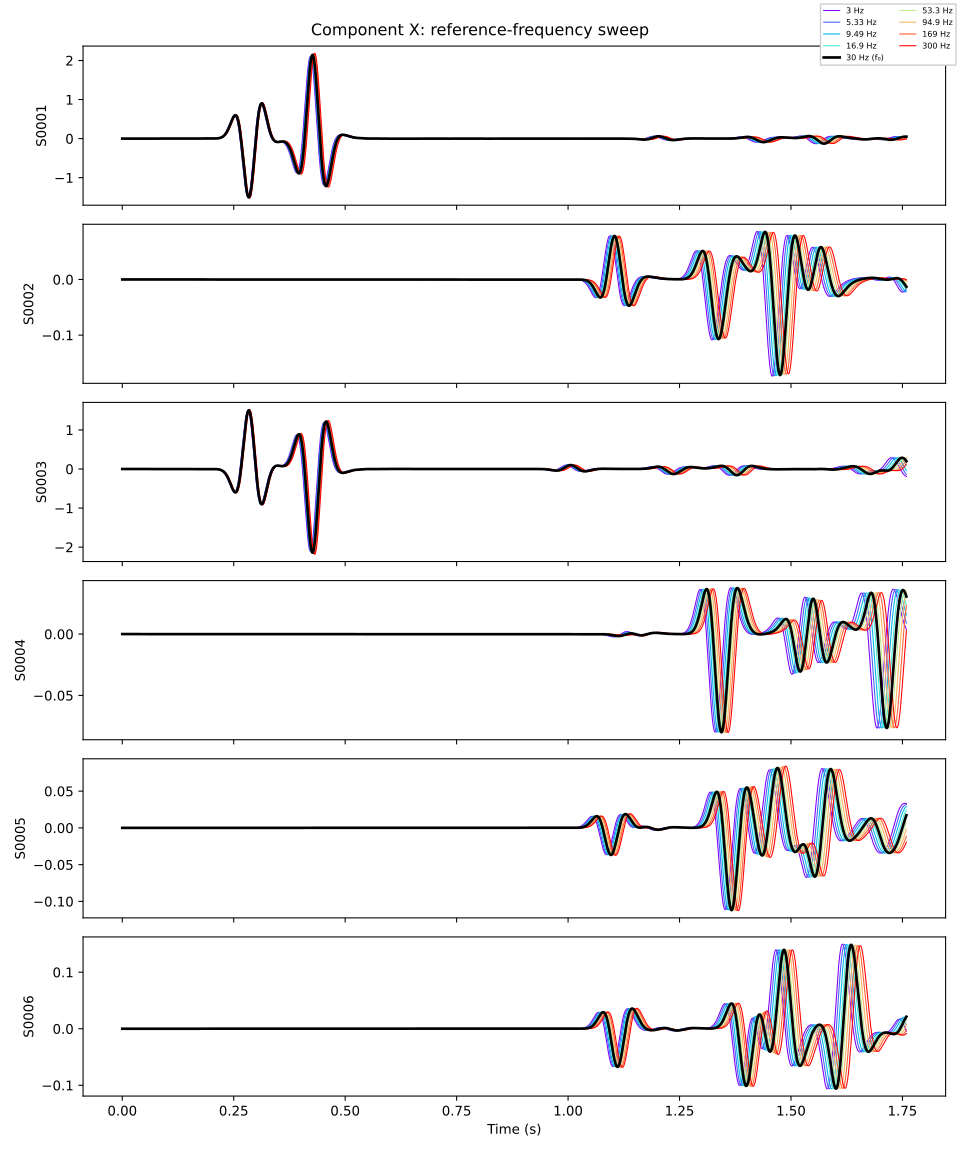
X-component (horizontal) velocity seismograms for all nine reference frequencies. The rainbow colormap runs from low (red) to high (violet) frequency; the central value 30 Hz is shown in black.
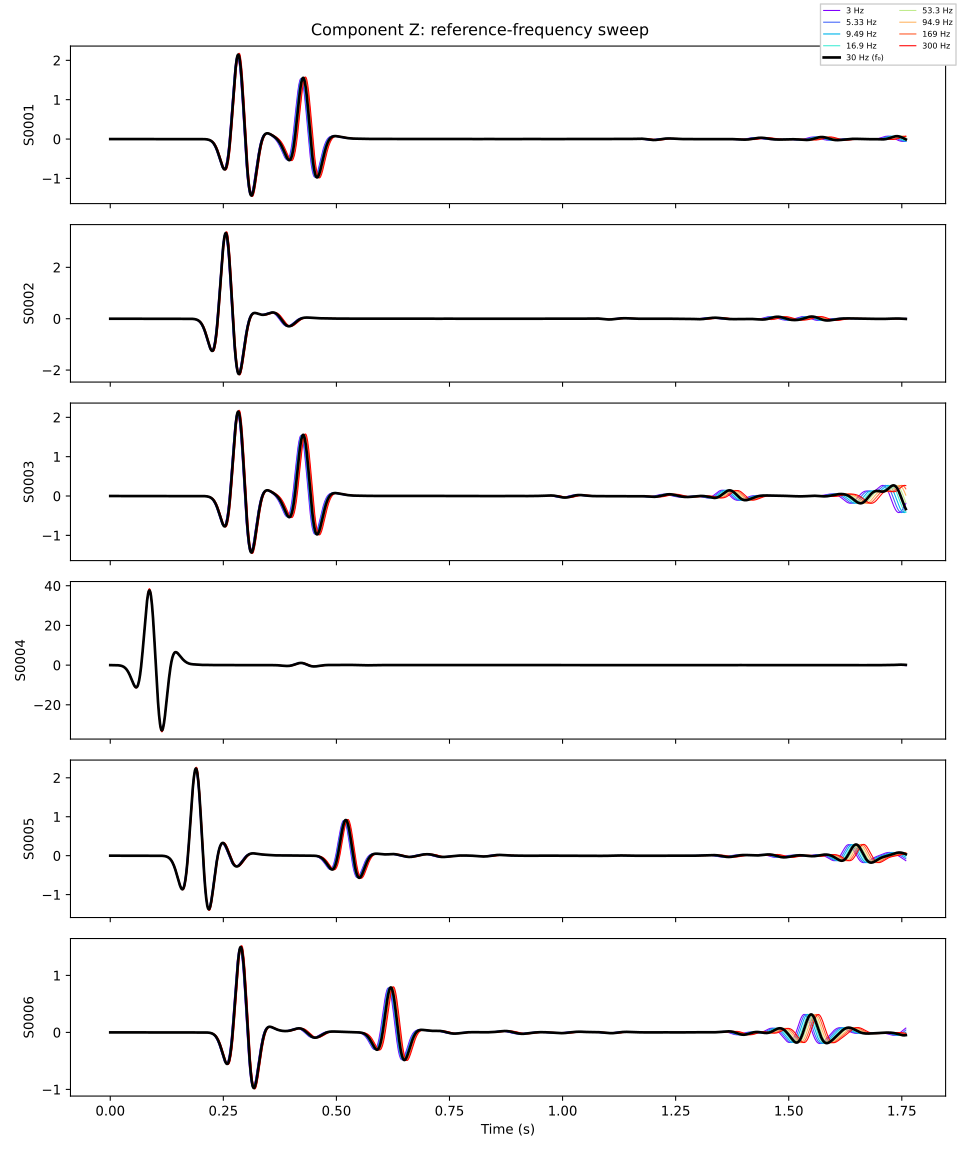
Z-component (vertical) velocity seismograms for the same sweep.
In both figures you should observe:
Velocity dispersion: the wavefield arrives slightly earlier or later depending on the reference frequency, because the SLS mechanism shifts the phase velocity of each frequency component differently.
Amplitude variation: the reference frequency controls the peak of the relaxation curve, so runs where the dominant source energy falls above or below the reference frequency show different amplitude levels.
Convergence at the center: the black trace (30 Hz) represents the “correct” reference for a 12.5 Hz Ricker source and serves as the baseline.
About the reference frequency
SPECFEM++ models viscoelastic attenuation using the standard linear solid
(SLS) mechanism. The reference-frequency is the frequency at which the
velocity model is specified: at this frequency the phase velocity equals
exactly the input Vp and Vs. Away from the reference frequency, the
Kramers–Kronig relations impose a corresponding phase-velocity dispersion.
Choosing a reference frequency well within the source bandwidth (i.e. near the dominant frequency of your Ricker wavelet) minimises the apparent velocity error. Choosing it outside the band causes a systematic shift of the entire wavefield. This example makes that effect visible by sweeping the reference frequency over two decades while keeping everything else fixed.
For full documentation of attenuation parameters refer to SPECFEM++ Parameter Documentation.