Wave propagation through fluid-solid interface
This example (see benchmarks/src/dim2/fluid-solid-interface)
simulates the fluid-solid example with flat ocean bottom from Komatitsch et.
al.. This example demonstrates the use of
the xmeshfem2D mesher to generate interface between 2 conforming material
systems and the setting up absorbing boundary conditions.
Setting up the workspace
Let’s start by creating a workspace from where we can run this example.
mkdir -p ~/specfempp-examples/fluid-solid-interface
cd ~/specfempp-examples/fluid-solid-interface
We also need to check that the SPECFEM++ executable directory is added to the
PATH.
which specfem2d
If the above command returns a path to the specfem2d executable, then the
executable directory is added to the PATH. If not, you need to add the
executable directory to the PATH using the following command.
export PATH=$PATH:<PATH TO SPECFEM++ DIRECTORY/bin>
Note
Make sure to replace <PATH TO SPECFEM++ DIRECTORY/bin> with the actual
path to the SPECFEM++ directory on your system.
Now let’s create the necessary directories to store the input files and output artifacts.
mkdir -p OUTPUT_FILES
mkdir -p OUTPUT_FILES/seismograms

touch specfem_config.yaml
touch single_source.yaml
touch topography_file.dat
touch Par_file
Meshing the domain
We first start by generating a mesh for our simulation domain using
xmeshfem2D. To do this, we first define our simulation domain and the
meshing parmeters in a parameter file.
Parameter file
#-----------------------------------------------------------
#
# Simulation input parameters
#
#-----------------------------------------------------------

# title of job
title                           = Flat fluid/solid interface

# parameters concerning partitioning
NPROC                           = 1              # number of processes

# Output folder to store mesh related files
OUTPUT_FILES                   = OUTPUT_FILES

#-----------------------------------------------------------
#
# Mesh
#
#-----------------------------------------------------------

# Partitioning algorithm for decompose_mesh
PARTITIONING_TYPE               = 3              # SCOTCH = 3, ascending order (very bad idea) = 1

# number of control nodes per element (4 or 9)
NGNOD                           = 9

# location to store the mesh
database_filename               = OUTPUT_FILES/database.bin

#-----------------------------------------------------------
#
# Receivers
#
#-----------------------------------------------------------

# use an existing STATION file found in ./DATA or create a new one from the receiver positions below in this Par_file
use_existing_STATIONS           = .false.

# number of receiver sets (i.e. number of receiver lines to create below)
nreceiversets                   = 1

# orientation
anglerec                        = 0.d0           # angle to rotate components at receivers
rec_normal_to_surface           = .false.        # base anglerec normal to surface (external mesh and curve file needed)

# first receiver set (repeat these 6 lines and adjust nreceiversets accordingly)
nrec                            = 11            # number of receivers
xdeb                            = 1450.d0        # first receiver x in meters
zdeb                            = 2400   # first receiver z in meters
xfin                            = 1575.d0        # last receiver x in meters (ignored if only one receiver)
zfin                            = 3400   # last receiver z in meters (ignored if only one receiver)
record_at_surface_same_vertical = .false.        # receivers inside the medium or at the surface

# filename to store stations file
stations_filename              = OUTPUT_FILES/STATIONS

#-----------------------------------------------------------
#
# Velocity and density models
#
#-----------------------------------------------------------

# number of model materials
nbmodels                        = 2
# available material types (see user manual for more information)
#   acoustic:    model_number 1 rho Vp 0  0 0 QKappa Qmu 0 0 0 0 0 0
#   elastic:     model_number 1 rho Vp Vs 0 0 QKappa Qmu 0 0 0 0 0 0
#   anistoropic: model_number 2 rho c11 c13 c15 c33 c35 c55 c12 c23 c25 0 0 0
#   poroelastic: model_number 3 rhos rhof phi c kxx kxz kzz Ks Kf Kfr etaf mufr Qmu
#   tomo:        model_number -1 0 9999 9999 A 0 0 9999 9999 0 0 0 0 0
1 1 2500.d0 3400.d0 1963.d0 0 0 9999 9999 0 0 0 0 0 0
2 1 1020.d0 1500.d0 0.d0 0 0 9999 9999 0 0 0 0 0 0

# external tomography file
TOMOGRAPHY_FILE                 = ./DATA/tomo_file.xyz

# use an external mesh created by an external meshing tool or use the internal mesher
read_external_mesh              = .false.

#-----------------------------------------------------------
#
# PARAMETERS FOR EXTERNAL MESHING
#
#-----------------------------------------------------------

# data concerning mesh, when generated using third-party app (more info in README)
# (see also absorbing_conditions above)
mesh_file                       = ./DATA/Mesh_canyon/canyon_mesh_file   # file containing the mesh
nodes_coords_file               = ./DATA/Mesh_canyon/canyon_nodes_coords_file   # file containing the nodes coordinates
materials_file                  = ./DATA/Mesh_canyon/canyon_materials_file   # file containing the material number for each element
free_surface_file               = ./DATA/Mesh_canyon/canyon_free_surface_file   # file containing the free surface
axial_elements_file             = ./DATA/axial_elements_file   # file containing the axial elements if AXISYM is true
absorbing_surface_file          = ./DATA/Mesh_canyon/canyon_absorbing_surface_file   # file containing the absorbing surface
acoustic_forcing_surface_file   = ./DATA/MSH/Surf_acforcing_Bottom_enforcing_mesh   # file containing the acoustic forcing surface
absorbing_cpml_file             = ./DATA/absorbing_cpml_file   # file containing the CPML element numbers
tangential_detection_curve_file = ./DATA/courbe_eros_nodes  # file containing the curve delimiting the velocity model

#-----------------------------------------------------------
#
# PARAMETERS FOR INTERNAL MESHING
#
#-----------------------------------------------------------

# file containing interfaces for internal mesh
interfacesfile                  = topography_file.dat

# geometry of the model (origin lower-left corner = 0,0) and mesh description
xmin                            = 0.d0           # abscissa of left side of the model
xmax                            = 6400.d0        # abscissa of right side of the model
nx                              = 144            # number of elements along X

STACEY_ABSORBING_CONDITIONS       = .true.        # use Stacey absorbing boundary conditions

# absorbing boundary parameters (see absorbing_conditions above)
absorbbottom                    = .true.
absorbright                     = .true.
absorbtop                       = .true.
absorbleft                      = .true.

# define the different regions of the model in the (nx,nz) spectral-element mesh
nbregions                       = 2              # then set below the different regions and model number for each region
1 144 1   54 1
1 144 55 108 2

#-----------------------------------------------------------
#
# DISPLAY PARAMETERS
#
#-----------------------------------------------------------

# meshing output
output_grid_Gnuplot             = .false.        # generate a GNUPLOT file containing the grid, and a script to plot it
output_grid_ASCII               = .false.        # dump the grid in an ASCII text file consisting of a set of X,Y,Z points or not
We define the acoustic and elastic velocity models in the Velocity and density models section of the parameter file.
65nbmodels = 2
defines the number of material systems in the simulation domain. We then define the isotropic velocity model for each material system using the following format:
model_number 1 rho Vp Vs 0 0 QKappa Qmu 0 0 0 0 0 0. Such model 1 is721 1 2500.d0 3400.d0 1963.d0 0 0 9999 9999 0 0 0 0 0 0
and model 2 is
732 1 1020.d0 1500.d0 0.d0 0 0 9999 9999 0 0 0 0 0 0
We define stacey absorbing boundary conditions on all the edges of the domain using the
STACEY_ABSORBING_CONDITIONS,absorbbottom,absorbright,absorbtopandabsorbleftparameters.113STACEY_ABSORBING_CONDITIONS = .true. # use Stacey absorbing boundary conditions 114 115# absorbing boundary parameters (see absorbing_conditions above) 116absorbbottom = .true. 117absorbright = .true. 118absorbtop = .true. 119absorbleft = .true.
Defining the topography of the domain
We define the topography of the domain using the following topography file
#
# number of interfaces
#
  3
#
# for each interface below, we give the number of points and then x,z for each point
#
#
# interface number 1 (bottom of the mesh)
#
  2
  0 0
  6400 0
#
# interface number 2 (ocean bottom)
#
  2
    0 2400
  6400 2400
#
# interface number 3 (topography, top of the mesh)
#
  2
    0 4800
  6400 4800
#
# for each layer, we give the number of spectral elements in the vertical direction
#
#
# layer number 1 (bottom layer)
#
## The original 2000 Geophysics paper used nz = 90 but NGLLZ = 6
## here I rescale it to nz = 108 and NGLLZ = 5 because nowadays we almost always use NGLLZ = 5
  54
#
# layer number 2 (top layer)
#
  54
Running xmeshfem2D
To execute the mesher run
xmeshfem2D -p Par_file
Note
Make sure either your are in the build directory of SPECFEM2D kokkos or the
../path/to/specfempp/bin directory is added to your PATH.
Note the path of the database file and a stations file generated after successfully running the mesher.
Defining the source
We define the source location and the source time function in the source file.
number-of-sources: 1
sources:
  - force:
      x : 1575.0
      z : 2900.0
      source_surf: false
      angle : 0.0
      vx : 0.0
      vz : 0.0
      Ricker:
        factor: 1e9
        tshift: 0.0
        f0: 10.0
Running the simulation
To run the solver, we first need to define a configuration file specfem_config.yaml.
parameters:

  header:
    ## Header information is used for logging. It is good practice to give your simulations explicit names
    title: Heterogeneous acoustic-elastic medium with 1 acoustic-elastic interface (orientation horizontal)  # name for your simulation
    # A detailed description for your simulation
    description: |
      Material systems : Elastic domain (1), Acoustic domain (1)
      Interfaces : Acoustic-elastic interface (1) (orientation horizontal with acoustic domain on top)
      Sources : Force source (1)
      Boundary conditions : Neumann BCs on all edges
      Debugging comments: This tests checks coupling acoustic-elastic interface implementation.
                          The orientation of the interface is horizontal with acoustic domain on top.

  simulation-setup:
    ## quadrature setup
    quadrature:
      quadrature-type: GLL4

    ## Solver setup
    solver:
      time-marching:
        type-of-simulation: forward
        time-scheme:
          type: Newmark
          dt: 0.85e-3
          nstep: 600

    simulation-mode:
      forward:
        writer:
          seismogram:
            format: ascii
            directory: OUTPUT_FILES/seismograms

  receivers:
    stations: OUTPUT_FILES/STATIONS
    angle: 0.0
    seismogram-type:
      - displacement
    nstep_between_samples: 1

  ## Runtime setup
  run-setup:
    number-of-processors: 1
    number-of-runs: 1

  ## databases
  databases:
    mesh-database: OUTPUT_FILES/database.bin

  ## Sources
  sources: single_source.yaml
With the configuration file in place, we can run the solver using the following command
specfem2d -p specfem_config.yaml
Visualizing the results
The simulation generates seismograms at the stations defined in the
specfem_config.yaml file. You can visualize the seismograms using the
following python script.
import glob
import os
import numpy as np
import obspy


def get_traces(directory):
    traces = []

    files = glob.glob(directory + "/AA.S00??.S2.BX?.semd")
    files.sort()

    ## iterate over all seismograms
    for filename in files:
        station_id = os.path.splitext(filename)[0]
        station_id = station_id.split("/")[-1]
        network, station, location, channel = station_id.split(".")[:4]
        trace = np.loadtxt(filename, delimiter=" ")
        starttime = trace[0, 0]
        dt = trace[1, 0] - trace[0, 0]
        traces.append(
            obspy.Trace(
                trace[:, 1],
                {
                    "network": network,
                    "station": station,
                    "location": location,
                    "channel": channel,
                    "starttime": starttime,
                    "delta": dt,
                },
            )
        )

    stream = obspy.Stream(traces)

    return stream


stream = get_traces("OUTPUT_FILES/seismograms")
stream.select(component="X").plot(size=(1000, 750))
stream.select(component="Z").plot(size=(1000, 750))
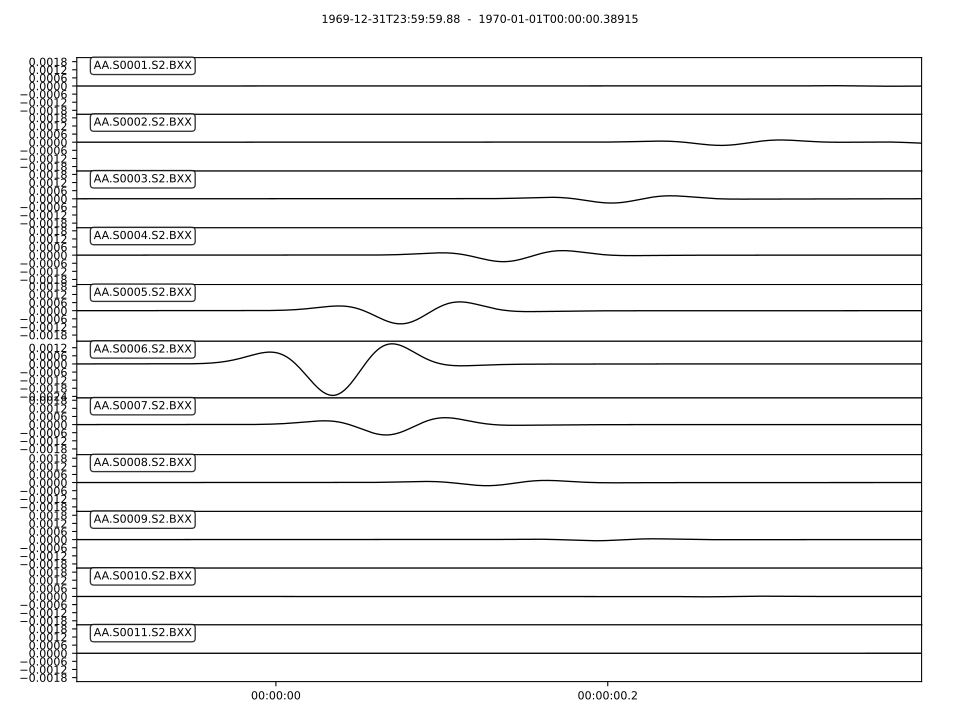
X-component seismograms
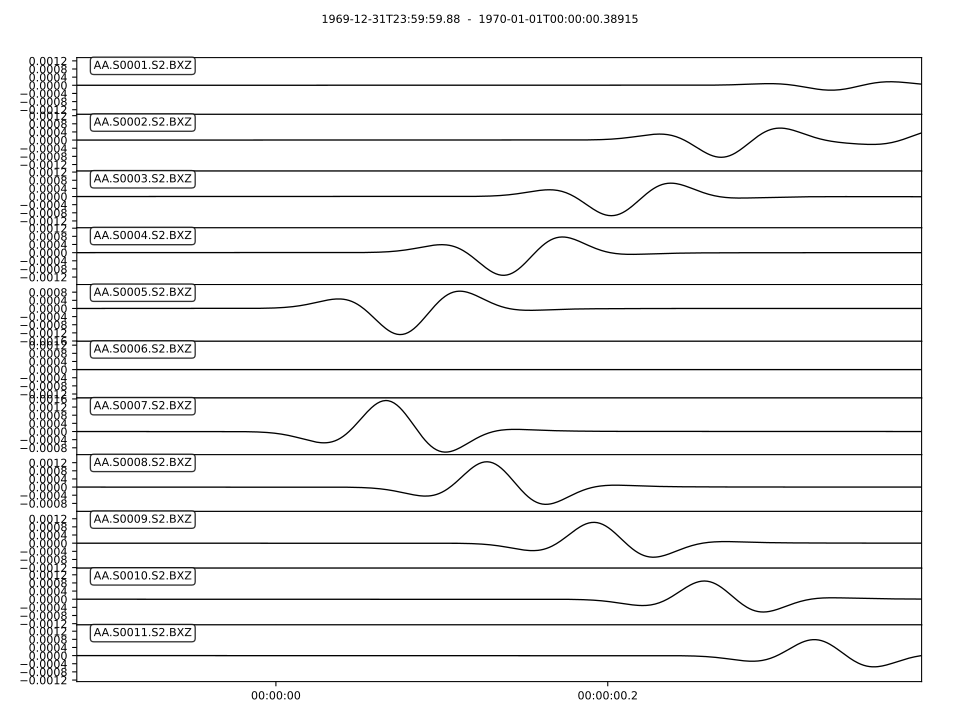
Z-component seismograms